
.png) 3 months ago
62
3 months ago
62
Apple’s Macs have been on a roll this year with the brand new budget MacBook Neo and a faster MacBook Air M5, but now it’s time for its workhorse MacBook Pro to be upgraded with the fastest, most powerful M-series chips.
The latest MacBook Pro comes in two screen sizes and a large range of chip and configuration options. The 14in version starts with the M5 chip costing £1,699 (€1,899/$1,699/A$2,699) and then jumps to the more powerful M5 Pro from £2,199 (€2,499/$2,199/A$3,499) before climbing further for the 16in version or the top M5 Max chip. A pricey machine for professional workloads.
The three chip versions of the laptop create three tiers of machine: the M5 is for people who need roughly the performance of a MacBook Air but want the much fancier screen, extra ports and other bells and whistles of the Pro model.
The M5 Pro version is the laptop most MacBook Pro buyers should consider, providing significantly greater performance for demanding workloads and faster wifi 7. If your work needs the M5 Max chip with twice the graphics power and up to 128GB of memory, you probably already know it.
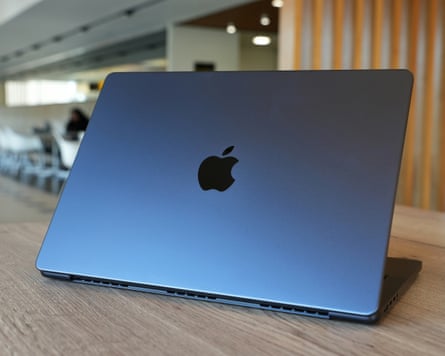
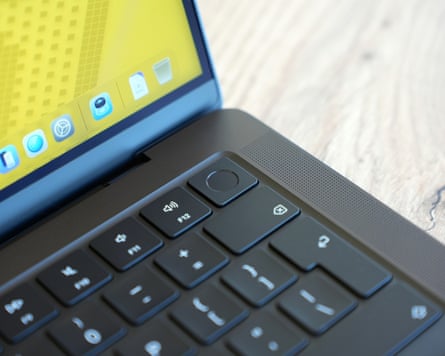
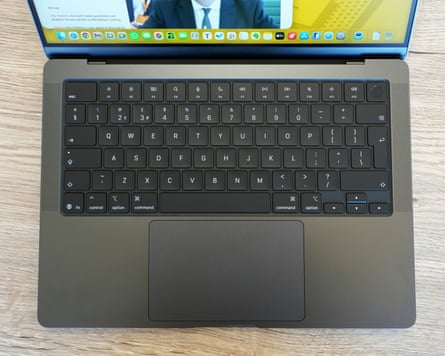
The laptop’s exterior hasn’t changed much since the design launched in 2021, but it has stood the test of time very well. The solid aluminium body looks great and travels well, slipping easily into backpacks and resisting the kind of flexing that causes screen and other issues. The keyboard and trackpad are first class and the super bright and crisp 120Hz mini LED screen is rarely rivalled in competitors’ machines.
Apple sells a nano texture upgrade for the display glass, which diffuses glare very effectively and is worth considering. Coupled with the sustained 1,000nit brightness of the screen – double the 13in MacBook Air – you can actually work outside in direct sunlight if need be.
The excellent Centre Stage webcam, high quality mics and some of the best speakers you’ll find on a laptop round out the package.
Specifications
-
Screen: 14.2in mini LED (3024x1964; 254 ppi) ProMotion (120Hz)
-
Processor: Apple M5, Pro or Max
-
RAM: 16, 24, 32, 36, 48, 64 or 128GB
-
Storage: 1, 2, 4 or 8TB SSD
-
Operating system: macOS 26.4 Tahoe
-
Camera: 12MP Centre Stage
-
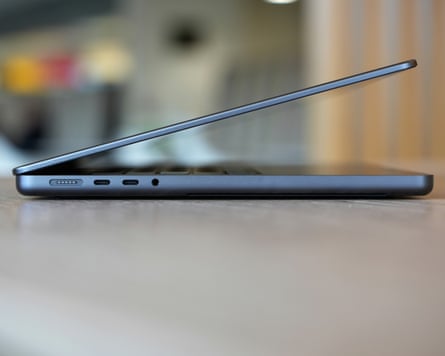
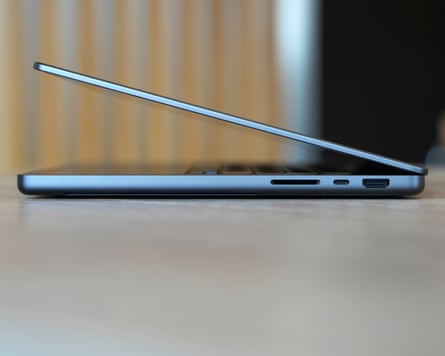
Connectivity (M5): wifi 6E, Bluetooth 5.3, 3x Thunderbolt 4/USB 4, HDMI 2.1, SDXC, headphones
-
Connectivity (M5 Pro/Max): wifi 7, Bluetooth 6, Thread, 3x Thunderbolt 5/USB 4, HDMI 2.1, SDXC card, headphones
-
Dimensions: 221.2 x 312.6 x 15.5mm
-
Weight: 1.55 to 1.62kg
Fast, faster and maxed out
The MacBook Pro confusingly has two different specifications based on which processor you pick. The base model with an M5 processor lacks Apple’s new N1 wireless chip, which means it misses out on wifi 7, Thread and Bluetooth 6 connectivity.
The M5 Pro and M5 Max laptops get all of those features, of which wifi 7 is the most welcome now that it is becoming common in home and commercial wifi routers. They also gain faster Thunderbolt 5 ports for high-speed accessories.
Otherwise the M5 chip is about 20% faster than the M4 version from 2024 and faster in all metrics than the MacBook Pro M1 Pro from 2021, making it a rapid machine in its own right. Stepping up to M5 Pro improves multicore processing by about 70% and effectively doubles graphics performance, while the M5 Max doubles the number of GPU cores again for workstation-level performance in a similar ballpark to machines equipped with Nvidia’s power hungry GeForce 5070 and 5080 graphics cards.
The result is that the MacBook Pro has the kind of raw performance typically associated with bulky gaming machines or desktop workstations, but mobile and fully available on battery power, something no PC laptop with similar performance can offer.
Even in the smaller 14in version with the M5 Max chip, as tested, the MacBook Pro offers very long battery life for general computing. It regularly lasted 16 hours of light work while mainly browsing, word processing, messaging and note taking, plus a couple of hours of editing photos. For heavier workloads of photo and video editing the laptop still saw out a solid workday with 30% remaining.
When pushed to maximum, the battery lasted a decent 90 minutes before needing to be plugged in, which is probably long enough to get the most demanding tasks done in a pinch.
Laptops equipped with the M5 Pro chip can expect up to about 18 hours of lighter work with the base-model M5 machines lasting slightly longer.
Sustainability
The MacBook Pro is made of 45% recycled materials, including aluminium, cobalt, copper, gold, lithium, plastic, rare-earth elements, steel and tin. Apple breaks down the computer’s environmental impact in its report.
The laptop is generally repairable and Apple makes repair manuals available. The battery should last in excess of 1,000 full charge cycles and can be replaced for £225 by Apple. The company offers trade-in and free recycling schemes, including for non-Apple products.
Price
The 14in MacBook Pro M5 starts at £1,699 (€1,899/$1,699/A$2,699), M5 Pro models start at £2,199 (€2,499/$2,199/A$3,499) and M5 Max at £3,599 (€4,199/$3,599/A$5,799).
For comparison, the MacBook Neo costs from £599, MacBook Air M5 costs from £1,099, the iPad Pro M5 costs £999, the 2026 Dell XPS 14 starts from £1,599 and the Razer Blade 14 costs £2,400.
Verdict
The MacBook Pro continues to show that you can, with the right chips and software, have your cake and eat it.
No other machine provides full workstation-level power away from a plug and lasts a long time on battery. It’s a potent combination that sails through workloads of all fashions, even in the sweet spot 14in size.
It helps that it also features a best-in-class trackpad, keyboard and one of the very best screens you can get on a laptop. Plus it has great speakers and mics, a great web cam and a decent port selection including the now rare SD card slot, making it a photographer’s best friend.
All this capability doesn’t come cheap and in many ways the latest MacBook Air is just as capable a machine, particularly if you’re looking at the base-model M5 MacBook Pro. But with the climbing cost of memory and storage driving up the price of rivals, everything is starting to look expensive.
So for those that need high-level power and long battery life in a quality, adaptable laptop, very little else even comes close to the MacBook Pro unless you specifically need Windows or Linux.
Pros: choice of extremely potent M5-series chips, minimum of 16GB memory and 1TB storage, very long battery life, fantastic ProMotion screen, great Centre Stage camera, plenty of ports and an SD card slot, brilliant speakers, Touch ID, great keyboard and trackpad, wifi 7, Bluetooth 6 and Thread support.
Cons: no Face ID, no USB-A, RAM or SSD cannot be upgraded after purchase, expensive, not a big upgrade on M4 model, no wifi 7 in base M5 version.